🚀 Official launch · October 5, 2026
--days--h--m

Your comments in 20 minutes, not 90.

In just a few clicks, Maestro composes quality report card comments for your whole class: accurate, nuanced, in the right tone for each student — no errors, never the same wording twice. You always keep the final say.

🇪🇺 Hosted in Europe· 🔒 GDPR compliant· Works with ManageBac, Toddle & any gradebook

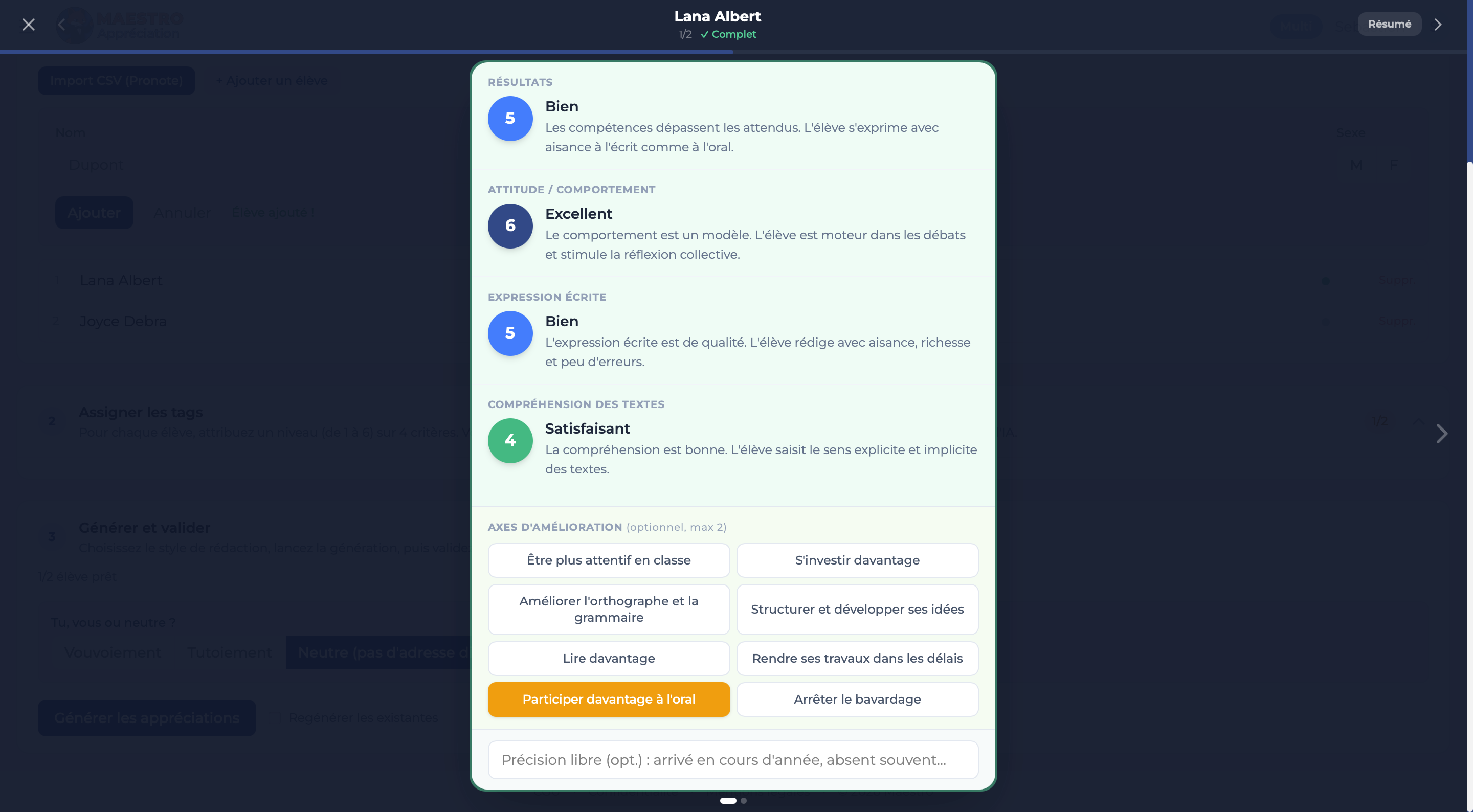
The Maestro dashboard on desktop: graded criteria and areas for improvement.

20 min

a whole class

~40 s

per student

3 levels

primary, middle & high school

0 duplicates

in class and across terms

For every level and every subject.

Vocabulary and level of challenge adjust to the year, from a simple, encouraging comment for the youngest students to a demanding, well-argued one for the oldest. And the tone follows each student: encouraging for the one who doubts, firmer for the one coasting on past results, always in your subject's vocabulary.

ChatGPT improvises. Maestro conducts.

The score is yours to write: for each student, you check off your criteria, your assessment. Maestro conducts — it arranges it all into fair, nuanced comments, consistent from one student to the next and one term to the next.

ChatGPT has no conductor: it plays each note in isolation, forgets what it just wrote, and repeats itself without noticing.

Same student. Two results.

On the left, a one-size-fits-all comment. On the right, one that's actually the student's.

With ChatGPT

"Léa is a serious, hard-working student who produces steady work. She takes part in class and gets satisfactory results. She should keep up her efforts to make progress."

Correct, but interchangeable — it could be any student.

With Maestro

"Léa approaches the term with real curiosity and genuine engagement. Her writing is gaining structure; the next step is to risk more personal analysis to confirm this fine potential."

Nuanced, true to how you see them, and unique to Léa.

Maestro writes like you…

Every teacher has their own voice. Some get straight to the point, others build their case gradually; some are warm, others more formal. Maestro adapts to all of it. In 5 quick choices, you set the structure of your comments, the sentence length, the level of detail and the register. Maestro also learns from your own writing: the more you use it, the better it grasps your style. The result? Report-card comments your colleagues won't tell apart from yours.

One-minute setup

5 interactive cards with concrete examples.

4 structures to choose from

Direct, progressive, sandwich or constructive.

Optional fine-tuning

Pick between AI-generated text pairs for an even closer match.

Continuous learning

Maestro analyzes your texts over time to capture your phrasing and vocabulary.

Always within reach

Recalibrate from the menu whenever your style evolves.

…and adapts to the way you assess.

The default tags already cover every subject. But you're the teacher: you can create your own criteria and shape the assessment exactly the way you want. Maestro doesn't force you into a mold — it fits your teaching. And you can try it all for free in Test mode.

Rewrite the areas for improvement

Test · Solo · Multi

Edit the 8 suggested areas for improvement so they reflect your expectations and truly speak to your students. They're your words, not an AI's.

Create your own tags

Test & Multi

Add criteria specific to your subject — a technical move in PE, a key concept in physics, fluency in speaking… Your comments fit your discipline exactly, not a generic template.

Up to 6 criteria per student

Test & Multi

Go from 4 tags (the default) to 6 when you want more nuance. More criteria means a finer assessment — and a more accurate comment.

Evaluate your students anywhere, even offline.

You're on the train. You check off the tags for three students on your phone. You get home, open Maestro on your computer: it's all already there. Just review and export.

  • Built for mobile. Check off your tags on your commute, at break, between classes.
  • Works offline. No signal? Maestro keeps everything and syncs the moment it's back online.
  • Seamless across your devices. Start on your phone, finish on your computer. Everything stays in sync.

Nothing to download. Maestro runs in your browser, everywhere.

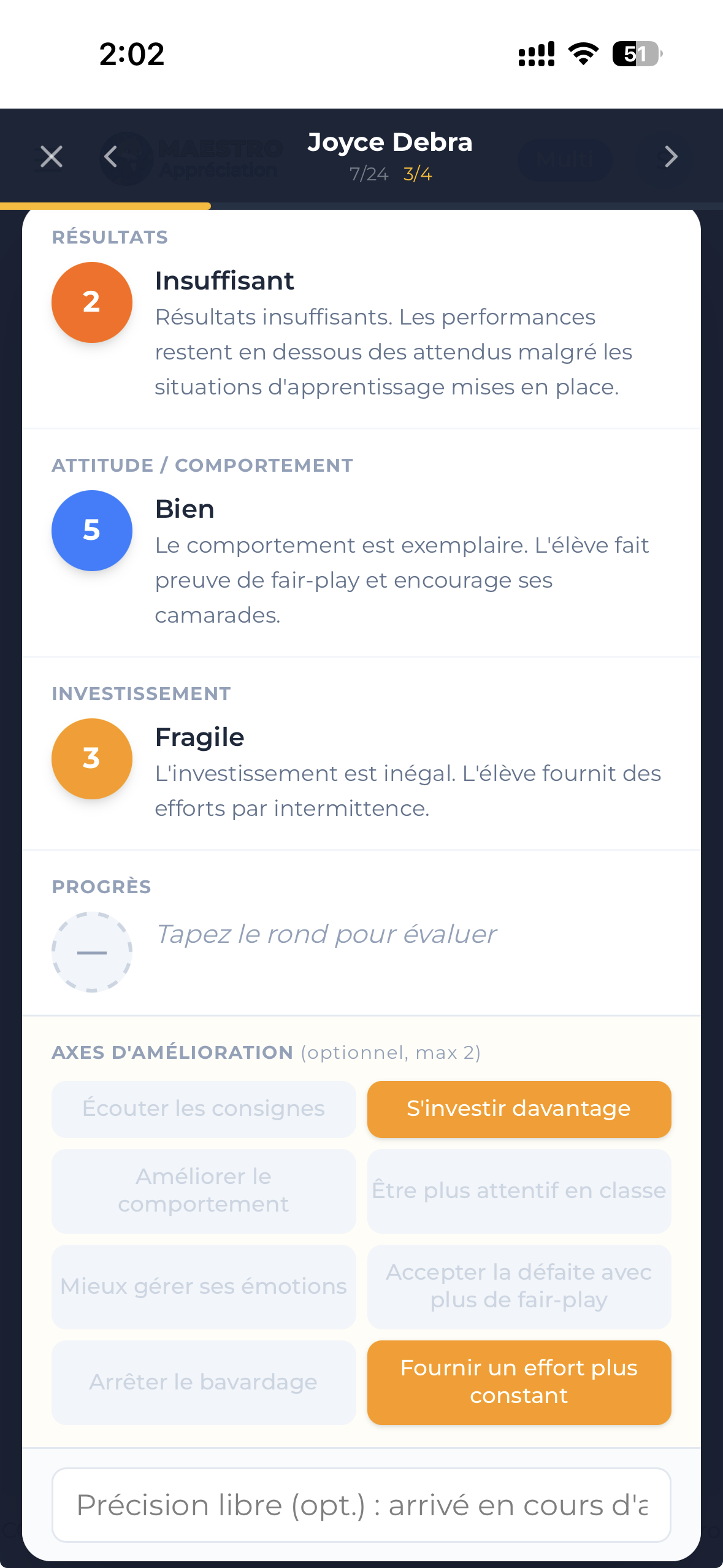
Maestro on a phone: scoring a student by criteria, and the areas for improvement to check off.

Your comments have a memory.

With Maestro, your comments never start from scratch. They talk about real progress, sustained effort, knowledge taking root — because they remember.

Term 1 — October

"Emma starts the year with lovely curiosity. She still needs to bring more rigor to her method…"

Term 2 — February

"Emma's efforts are paying off: the method and rigor noted last term are really starting to settle in…"

Term 3 — June

"Another strong term for Emma. The progress that began in September is holding steady at a good level…"

No duplicates, ever. No two students in the same class ever get the same comment. And for any one student, the comment evolves from one term to the next — even if you check off the exact same tags. Maestro rewrites it so it stays unique: from student to student, and from term to term.

A feature reserved for the MULTI plan. Neither ChatGPT nor a phrase bank can do this: with no memory, they start over from scratch every term.
Three steps, and it's written.

01

Import your class

Paste your list from your gradebook, import a CSV, or add students by hand. In seconds your classes are ready and saved for the whole year.

02

Check off what you observe

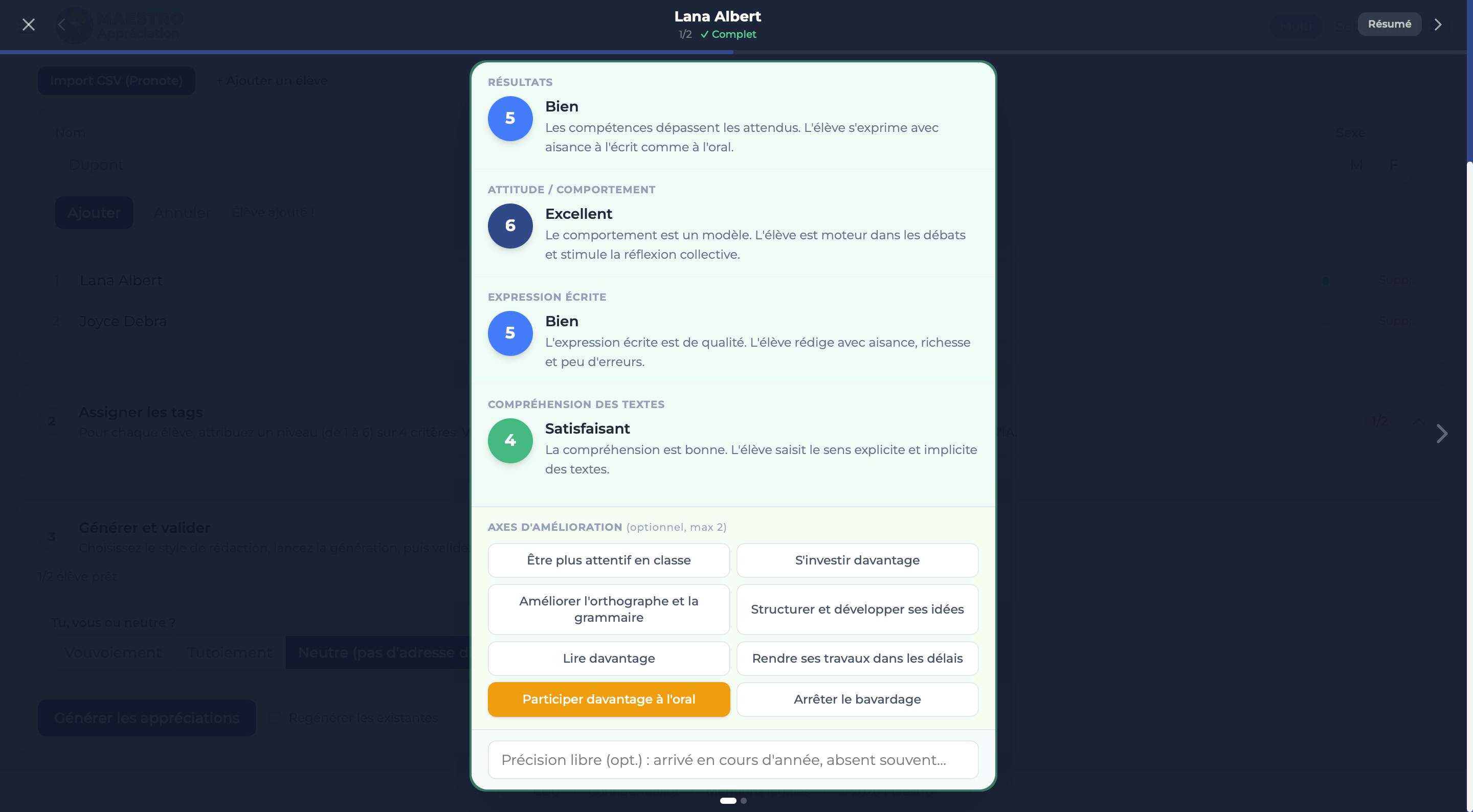
For each student, you rate 4 criteria on a 1 to 6 scale tailored to your subject. No writing at all — Maestro reads your settings the way a seasoned teacher in your field would.

03

Review, adjust, copy

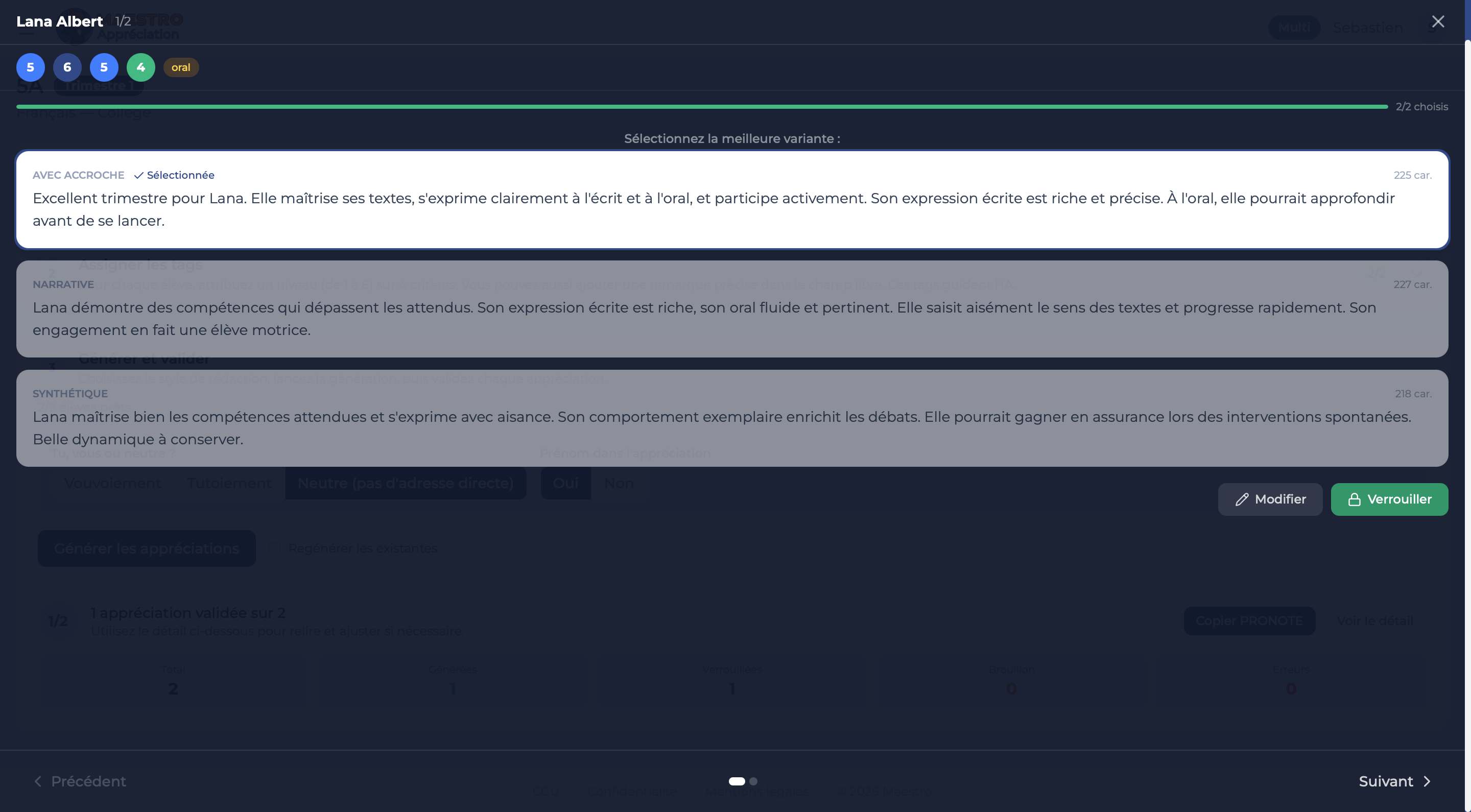
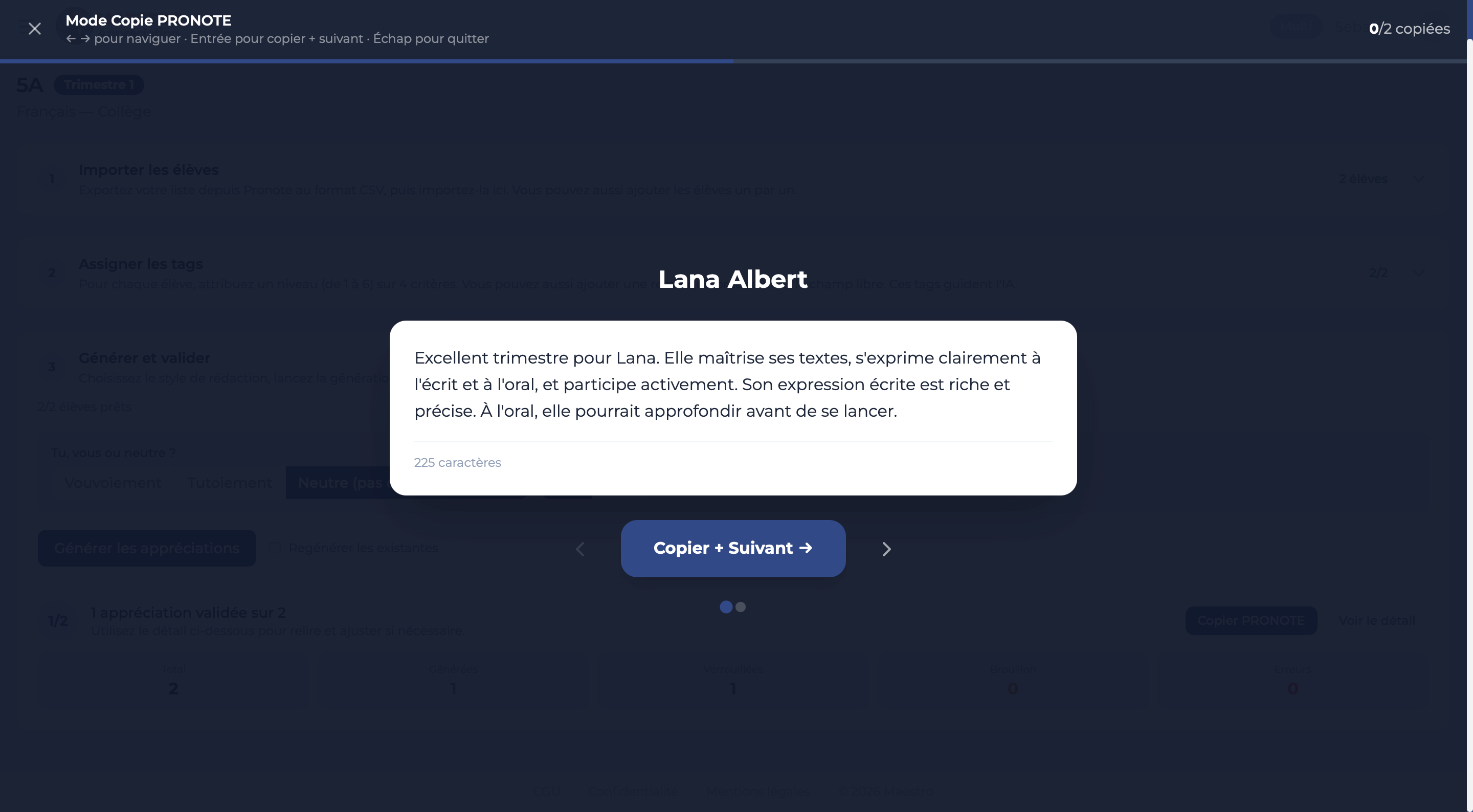
Maestro writes a nuanced comment, in the right tone and the right length. You tweak a word or regenerate it in one click, then copy-paste into your gradebook with Quick Copy mode.

Choose your plan.

Available October 5. Reserve now to get priority access at launch. No subscription: you pay once for the period you choose, and the price won't go up every year.

Test

The full Multi experience, capped at 1 class of 5 students.

$0
  • 1 class · 5 students
  • 3 regenerations per student
  • Create your own tags
  • Up to 6 criteria · editable areas
  • Memory & no duplicates
  • CSV import · Quick Copy to any gradebook
  • Mobile + offline
Try now

Solo

Period Pass · for a real test run.

$9.99
  • 30 days of access
  • All your classes, all your students
  • 3 regenerations per student
  • Editable areas for improvement
  • CSV import · Quick copy to any gradebook
  • Mobile + offline

What you really gain with Maestro.

Time

From 90 minutes to 20 per class. Over a year, that's the better part of a workday given back to you.

Peace of mind

No more Sunday-night panic before reports are due.

Quality

Nuanced comments, never the same phrasing twice.

Credibility

A fitting tone, tailored to the level and to each student.

Freedom

Started on the train, finished at home. Even without a signal.

Control

You always keep the final say. Adjust, regenerate, or rewrite by hand before exporting.

"I finished my 32 comments for Grade 8 in under half an hour, between grading two papers. For once, I didn't have to reread the same sentence three times."
Claire, English, middle school (Singapore).
"What blew me away is that the tone stays mine. I'm fairly demanding, and the comments stayed that way. I barely touched a thing."
Sophie, mathematics, middle school (Geneva, Switzerland).
"In Grade 5, I write comments that have to stay kind without turning saccharine. Maestro finds that tone better than I do some Sunday nights."
Thomas, primary teacher (Dubai).
"Before, my report cards took me two evenings. Now it's one Saturday afternoon, and I have time to really reread each student."
Nadia, biology, middle school (Hong Kong).

The questions we get asked.

Do all the comments end up sounding alike?
No. Maestro checks in real time that no phrasing is reused within the same class — no two students ever get the same comment. On Multi, the check extends across the whole year: the same student never gets the same comment twice, even if you check off the exact same tags from one term to the next.
Does it replace what I would write?
No. Maestro starts from what YOU observe. You stay the author: each comment can be regenerated up to 3 times, adjusted manually or rewritten entirely before export. Nothing reaches your gradebook without your approval.
Does it work for primary school?
Yes. The tone adjusts automatically to the level, but above all it's the assessment criteria themselves that are tailored to each level. In primary you might assess things like reading aloud, handwriting or working with others; in middle and high school the criteria become more subject-specific: mathematical reasoning, written argument, experimental method, and so on. Maestro draws on a framework specific to each level to write a genuinely relevant comment.
Is my students' data protected?
Yes. Hosting in Europe, end-to-end encryption, GDPR compliance. No data resold, no data used to train an AI.
Can I export to my gradebook?
Yes. Guided copy-paste (Quick Copy mode), CSV export, PDF export — into ManageBac, Toddle or any gradebook.
Can I use it on my phone?
Yes. Maestro adapts to every screen. You can check off your tags from your phone on the go, then finish reviewing on your computer in the evening. Everything syncs automatically.
What if I have no internet connection?
You can assess your students and select their comments entirely offline: everything is kept in local memory. Writing the comments, however, requires a connection, since it relies on AI. In practice, you prepare everything on the train or in the staff room, then start the writing as soon as you're back online. Your data then syncs automatically.
Is it ethical to use this?
Yes. You stay the teacher who observes, assesses and decides. Maestro is a phrasing tool, like an advanced spell-checker. You check off what YOU observe in class — your pedagogical judgment structures everything.
What's the difference between Solo and Multi?
Solo covers one term, then everything is wiped at the end. Multi covers a full school year and keeps your classes, your students and, above all, your previous comments. That is what lets Maestro write comments that speak of progress, effort and growth.
I teach in an international or IB school. Is it compatible?
Yes. Maestro adapts to international curricula, including the IB. Multi runs on a 300-day rolling window, which covers a school year whatever your calendar (terms or semesters, northern or southern hemisphere). It works with any gradebook via copy-paste, CSV or PDF.
If I get used to Maestro, will I lose my ability to write comments?
No. Maestro only puts into words what YOU observe. You remain the one who analyzes, nuances and chooses. The intellectual work isn't in the wording — it's in fairly assessing each student. Maestro can't do that for you, and doesn't try to.

Another question? Message us on WhatsApp →

Let Maestro set the tempo.
You keep the final say.

5 students, 1 class. Your first comment is ready in 30 seconds.

A question? Message us, we reply within a few hours. (Messages only)